Voice control for AI coding agents
Your agents work 24/7. You don’t have to.
Suzu runs Claude Code, Codex, GitHub Copilot and Cursor in the background, watches every task, and calls you only when one is done, stuck or waiting for your yes. Answer out loud, then get on with your day.
Say Hey Suzu or press CtrlShiftSpace from anywhere
- Windows 10 and 11
- Uses the AI plans you already pay for
- Your voice never leaves your computer
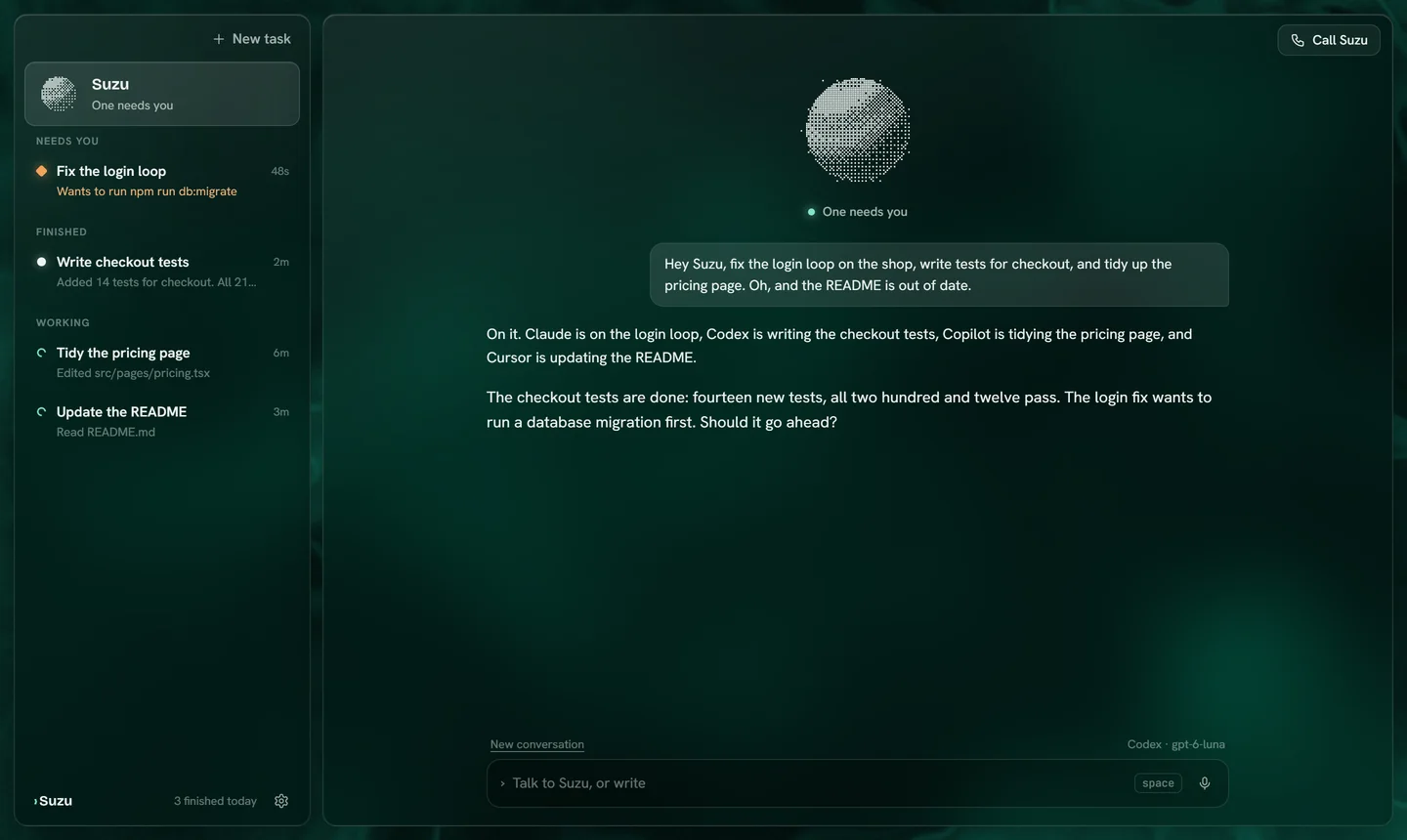
YouHey Suzu, fix the login loop, write the checkout tests, tidy the pricing page and update the README.
SuzuCheckout tests pass. The login fix wants to run a database migration. Go ahead?
The problem
Your agents are fast. Waiting for you is the slow part.
Coding agents stop to ask, fail quietly, or finish while you are looking elsewhere. Every minute one waits for a yes you did not see is a minute nobody is working, and you spend your day tab-hopping to find it.
Without Suzu
- A terminal per agent, each with its own way of asking for permission.
- An agent waits half an hour for a yes you did not see.
- You check on finished work by reading logs.
- Every new idea means typing another careful prompt.
With Suzu
- One list: what needs you, what is working, what is done.
- Suzu speaks up the moment an agent asks, and you answer out loud.
- “How are things going?” gets a two-sentence answer.
- Say what you want; Suzu writes the brief and picks the agent.
Around the clock
They don’t sleep. You should.
Hand the work over before lunch, a meeting or bedtime. Your agents keep going while you are away; Suzu keeps the list, holds anything risky for your yes, and gives you the short version when you are back.
- Keeps your PC awake while agents workand lets it sleep again when the last task is done.
- Nothing risky runs on its ownA command that needs permission waits for you, however long you are gone.
- The short version, on request“What happened?” gets two sentences, not a log.
You“Hey Suzu, three things before I go: fix the login loop, write the checkout tests, tidy the pricing page.”
Suzu“On it. Claude, Codex and Copilot each have one.”
Codex finished the checkout tests. 14 new tests, all passing.
Claude wants to run a database migration. It waits for your yes.
Copilot finished the pricing page.
You“Morning, Suzu. What happened?”
Suzu“Two tasks are done. The login fix needs your yes for a migration.”
Agents run on your PC while it is on. Suzu stops Windows from falling asleep while a task is working.
How it works
Say it. Let them work. Hear when it matters.
Say what you want
“Hey Suzu” starts a conversation. Suzu turns what you said into a clear brief and splits independent work into separate tasks.
Hey Suzu, fix the login loop and add tests for checkout.
Agents work in parallel
Each task runs on the agent you prefer, in your project folder, in the background. Close the window; they keep going.
On it. Claude has the login loop, Codex the tests.
Suzu rings when it matters
Finished, failed or waiting for permission: Suzu tells you once, in one sentence, and you decide by voice.
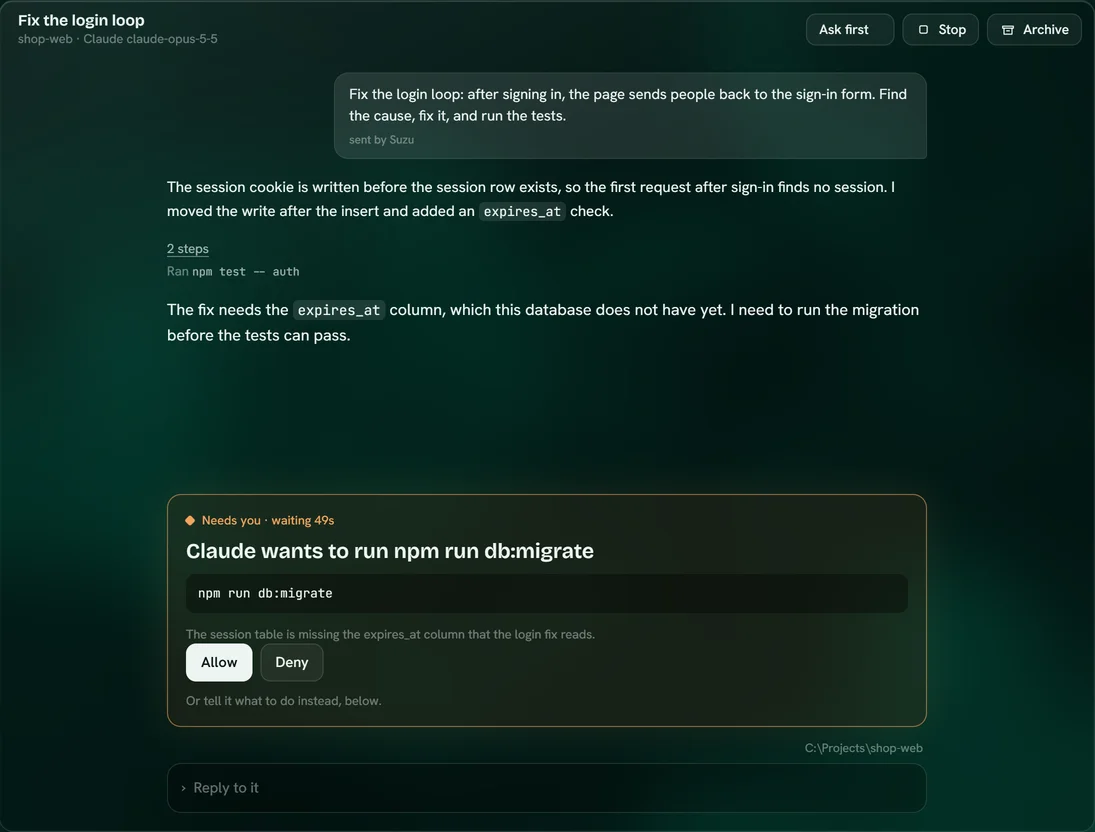
The login fix wants to run a migration. Go ahead?
Stay in control
Nothing risky runs without your yes.
When an agent wants to run a command or change something important, the task moves to Needs you and Suzu tells you exactly what it wants and why.
- Approve by voice“Yes, let it run that.” “No, use the staging database.”
- Choose how free each task isAsk first, edit freely, or full auto, per task.
- See every stepEvery command, edit and result is listed in the task.
Your agents, your accounts
Bring the plans you already pay for.
Suzu runs each provider's own agent on your computer, signed in with your own account. Your limits and bills stay exactly where they are; Suzu never resells or marks up usage.
Why Suzu
Not another terminal. Not another dictation app.
Other tools solve part of the problem. Suzu is the only one we know of that combines all of it: parallel agents from every vendor, a voice that supervises them, and speech that stays on your machine.
| What matters | Suzu | Agent orchestrators | Built-in voice modes | Dictation apps |
|---|---|---|---|---|
| Several agents at once | In the background | Yes | One session | No |
| Claude, Codex, Copilot and Cursor together | All of them, plus 75+ models | Some | One vendor | Not applicable |
| How you talk to it | A conversation: wake word, it answers out loud | Keyboard | Voice into one agent | Speech becomes typed text |
| When an agent needs you | Suzu tells you and you answer by voice | You check the window | You check that tool | Not applicable |
| Windows | Built for Windows first | Often Mac only | Varies | Varies |
| Where your voice is processed | On your computer, always | Not applicable | Varies by product | Varies by product |
| English and German | Listens and speaks both | Not applicable | Varies | Varies |
Compared by category from public product pages, November 2026. Individual products in each category differ.
Private by design
Your voice stays on your computer.
Listening and speaking run locally, on models that download once. Only the task text and the code your agents work on go to the provider you chose, exactly as if you used their tool directly.
to understand a spoken sentence, on the processor, offline. Measured on a desktop PC.
of audio uploaded. Speech recognition and the voice both run on your machine.
No analytics, no ads. API keys are encrypted with Windows' own credential protection.
Pricing
Less than an hour of your time, every month.
One licence covers one person on up to three computers. Your licence key arrives by email right after checkout.
USD is the base currency. Checkout charges USD.
Monthly
Cancel any time.
- Every agent and every feature
- All updates while subscribed
- Up to three computers
Yearly
$4.92 a month. Save 30%.
- Everything in Monthly
- Price locked for the year
- Up to three computers
Lifetime
Pay once, keep it.
- $32first 20
- $49next 200
- $79last 300
- Yours to keep, with every update of Suzu 1 and 2
- Up to three computers
Prices are based in US dollars, including applicable VAT. Local-currency amounts are estimates; checkout charges USD, and your bank’s exchange rate or fees may differ.
You also need a plan or API key from at least one AI provider. Lifetime licences are limited to 520 in total; after that, Suzu is sold monthly or yearly only.
Questions
Before you buy
Do I need an AI subscription as well?
Yes. Suzu supervises agents; the agents' usage runs on your own Claude, ChatGPT, Copilot or Cursor plan, or on an API key. Most people already pay for at least one. Suzu does not resell or mark up model usage.
Which Claude plans work?
Pro, Max, Team and Enterprise, or an Anthropic API key. You sign in once through Claude Code's own login, which opens in a terminal window. Suzu never sees your password or token.
Why does Antigravity open its own window?
On Google AI Pro and Ultra, Google does not support other apps running Antigravity in the background. So Suzu opens the real Antigravity in its own window with your brief already in it, and you work with it there. With a Gemini Enterprise account, Suzu runs it in the background like every other agent.
Does my voice leave my computer?
No. Speech recognition (Parakeet and Whisper) and the voice (Kokoro) run locally. Only the text of your tasks, and the code the agents work on, go to the AI provider you chose.
What computer do I need?
Windows 10 or 11 (64-bit), a 4-core processor, 8 GB of memory (16 GB is better for several agents), 3 GB of free disk space and a microphone. A graphics chip from roughly the last six years makes spoken answers start quickly; without one, they start a few seconds later.
Can I type instead of talking?
Yes. Everything you can say, you can type. Voice is there for when your hands and eyes are busy.
Does it speak German?
Yes. Suzu understands and answers in English and German.
Why does the lifetime price go up?
Early buyers take the biggest bet on a new product, so they pay the least. The first 20 lifetime licences cost $32, the next 200 cost $49, and the last 300 cost $79. After that, lifetime licences are no longer sold.
Is there a trial?
No. The monthly plan is the low-commitment way to start: cancel whenever you like and your licence runs until the end of the month you paid for.
Mac and Linux?
They are on the way. Suzu ships for Windows first because most tools in this space started on the Mac.
Your agents work 24/7. Now they have someone to report to.
Install, sign in with the AI accounts you already have, and say “Hey Suzu”.